A deep dive for paid-media buyers and the people who sign off on their budgets.
The campaign that reports heroics while your bank balance stays flat
It is Monday morning. You open Google Ads, and Performance Max is having a wonderful month. ROAS is up, the green arrows are everywhere, and the campaign is politely asking for more budget. Then you open the P&L. Revenue did not move. New customers did not move. The only thing that moved was which column got to claim the sale.
Welcome to the strangest product in performance marketing. Four-plus years after launch, Performance Max — PMax to anyone who has had to say it out loud in a meeting — remains exactly what it always was: Google’s AI allocating one budget across its entire ad inventory in real time. What changed is not the engine. It is the glass. Between 2025 and late 2026 Google installed window after window into the box: search terms, channel reports, negatives, brand exclusions, audience exclusions, budget projections, self-serve lift studies. You can now see a great deal. You still cannot steer most of it.
That distinction is the whole game. Confuse visibility with control and you will spend 2026 optimizing a dashboard instead of a business. So let us do the unglamorous thing: open the box, label every dial, note which ones are painted on, and build a way to run the thing without getting fleeced by its own report card.
What Performance Max actually is
One budget, seven surfaces
Google describes PMax as a goal-based campaign type that gives you all of its advertising inventory from a single campaign: Search, the Google Display Network, YouTube, Discover, Gmail and Maps. The channel performance report breaks serving into seven rows — Google Search, GDN, YouTube, Discover, Maps, Gmail and Search partners — and GDN alone spans roughly 35 million websites and apps.
You bring three things: conversion goals (with an optional CPA or ROAS target), creative assets, and audience signals. Google brings Smart Bidding, attribution, and a model of who is likely to convert. It then decides, auction by auction, which surface, which asset combination, which landing page and which bid. You do not buy a channel. You fund an outcome, and the machine shops for it across every shelf Google owns.
That is genuinely useful when you want reach beyond a keyword list. It is genuinely dangerous when the machine can buy the customers you already had.
Why the split stays opaque at precision
Here is the honest version, because the internet still argues about it. PMax now has a channel performance report with cost, conversions and conversion value by surface, and it accepts date ranges after 6 June 2025. So the old complaint — “I cannot see where my money went” — is out of date.
But seeing cost by channel is not the same as controlling it. Until October 2026 there was no per-channel budget dial at all, and even the new one (more on that below) groups Google’s own surfaces together. Google has also said plainly why channel-level CPA is a trap: in a cross-channel campaign, a journey that starts on Discover and ends on Search is one conversion, and slicing its CPA by surface invents fiction. Treat the channel report as a diagnostic of where the ads served, not as a verdict on which channel “works.”
The 2025–2026 transparency ledger: windows, not doors
What shipped in 2025
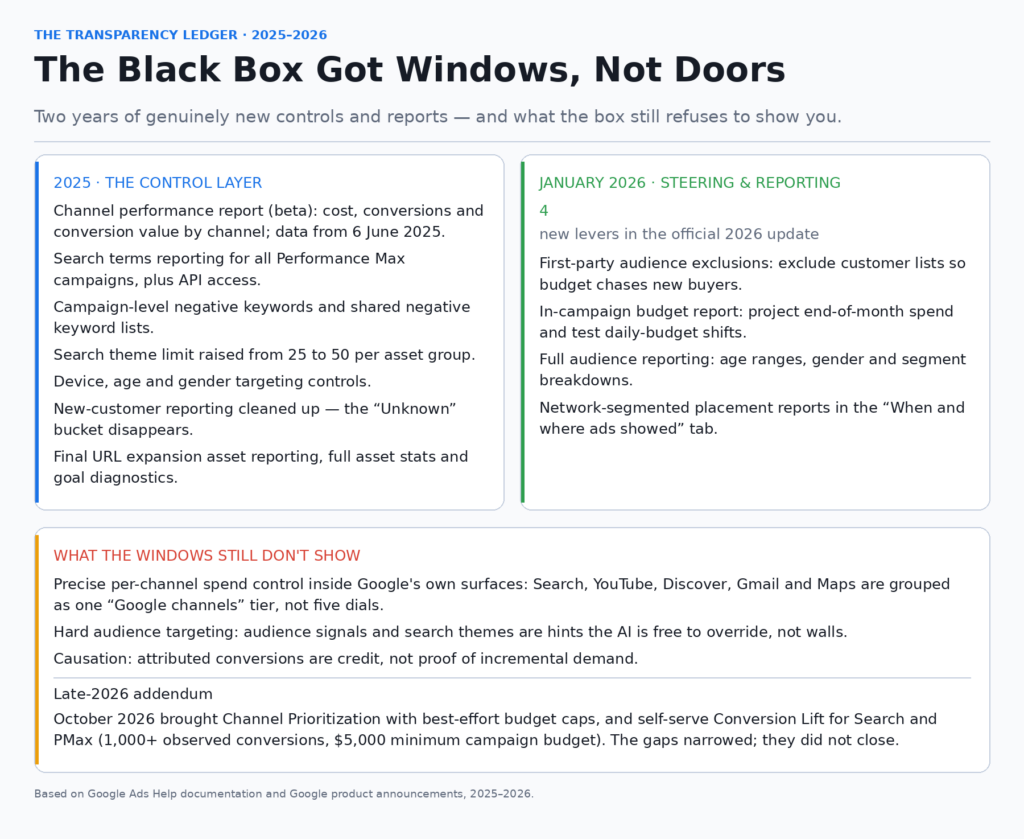
The 2025 batch was the plumbing. Campaign-level negative keywords rolled out to every advertiser early in the year, then gained shared negative lists (up to 10,000 negatives per PMax campaign, with a 1,000-term account-level cap). Search terms reporting opened to all PMax campaigns and the API. The search theme limit went from 25 to 50 per asset group. Device, age and gender controls arrived. New-customer reporting stopped labelling conversions “Unknown.” Full asset stats, final-URL-expansion asset reporting, goal diagnostics and creative recommendations followed in August. And the channel performance report beta landed at Google Marketing Live.
Notice the pattern: almost all of it is reporting and exclusion, not allocation. A window, every time.
What landed in 2026
Google’s January 2026 Accelerate note (picked up again across the trade press in March) added four things: first-party audience exclusions, an in-campaign budget report that projects end-of-month spend, full audience reporting by age, gender and segment, and network-segmented placement reports in a new “When and where ads showed” tab. Search Engine Journal and Search Engine Roundtable both read it the same way: useful day-to-day visibility, not a redesign of how PMax works.
The first one is the interesting one. You can now exclude a Customer Match list so the budget hunts net-new buyers instead of re-emailing people who already converted. Google even frames it as acquisition steering. It is directional steering, though — the same company that sells you the automation also warns that a stale, thin list will not save you.
What the box still will not show
Three gaps survive everything above. You cannot set a hard budget for Search versus YouTube inside Google’s own surfaces. Audience signals and search themes remain hints the AI may override — Google’s help page says PMax “may show ads to relevant audiences outside of your signals” when it thinks they will convert. And attributed conversions are credit, never causation.
Brand protection on day one
Entity-aware exclusions, not literal strings
Negative keywords and brand exclusions look like twins. They are different tools. A negative keyword is a literal string with a match type; Google’s own documentation notes negatives do not catch close variants cleanly, so a “flower” negative can still let “red flower” through. A brand exclusion works from a brand list: Google maps the query to the brand entity, which means misspellings, variants and non-Latin scripts are handled for you. Its own PMax FAQ calls brand exclusions “often the better option for blocking brand traffic” for exactly this reason.
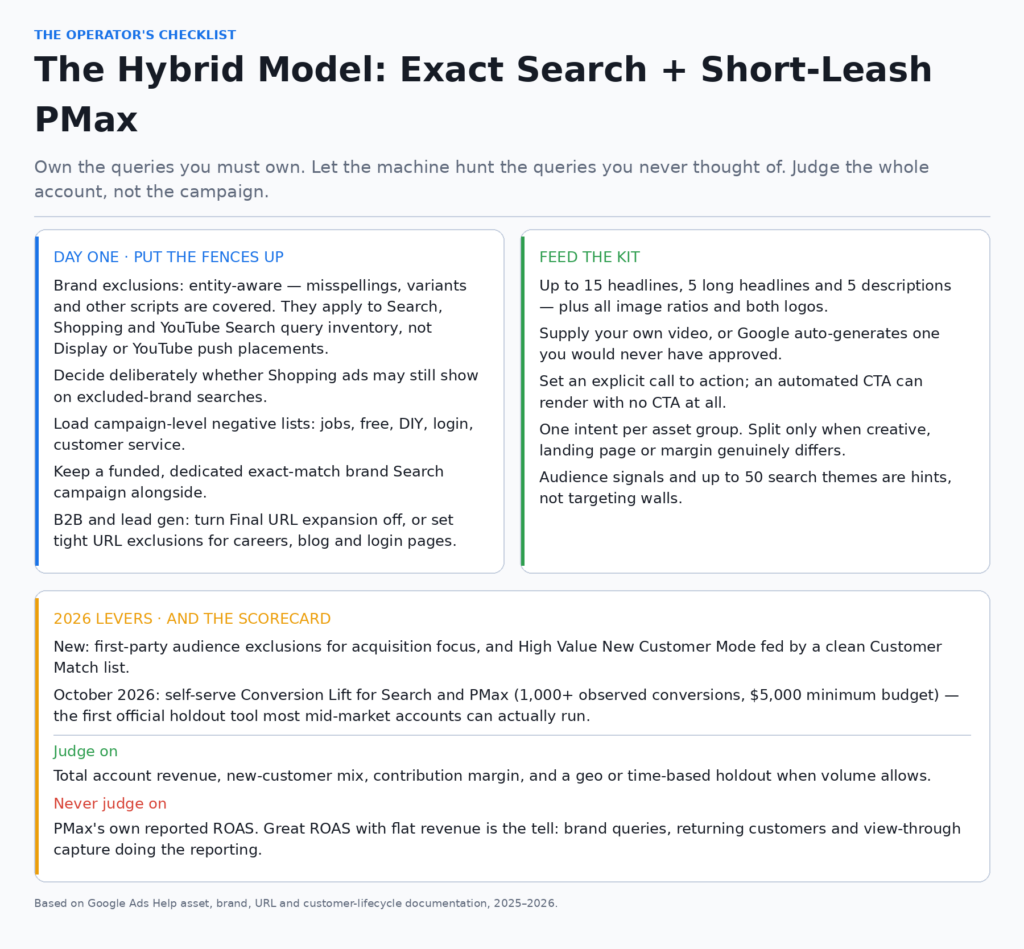
Use both. Brand exclusions are the blanket for your own name and competitor names; negatives are the scalpel for intent words like “jobs,” “free,” “DIY,” “login” and “customer service” that are not brands at all.
The line the exclusion cannot cross
Now the catch that decides strategy. Per Google’s current brand-exclusions help page, PMax brand exclusions apply to Search, Shopping and YouTube Search inventory — the query-based surfaces. Some older help pages still say Search and Shopping only, which is the sort of documentation drift worth knowing about when a colleague quotes a 2024 screenshot at you. On either reading, the exclusion does not reach YouTube in-feed, Display, Discover, Gmail or Maps placements. Your existing customers can still see a PMax ad on YouTube while your brand exclusion quietly blocks only the searches.
Retailers get one more switch: “Allow Shopping ads on searches that mention excluded brands.” Tick it and text ads stay off brand queries while product cards keep showing — a clean setup when you run brand text ads in a separate Search campaign.
Keep a funded brand Search campaign
An exclusion without a destination is just less reach. Google’s own guidance says PMax may still serve on exact-match brand terms when the Search campaign is budget-limited or more narrowly targeted. So run a dedicated, adequately funded exact-match brand Search campaign alongside, and let the exclusion route brand queries to the place where you control the copy, the bid and the budget. Yes, PMax’s reported ROAS will drop when you do this. That drop is the point: you are removing borrowed credit, not customers.
The query priority ladder: who wins the same query
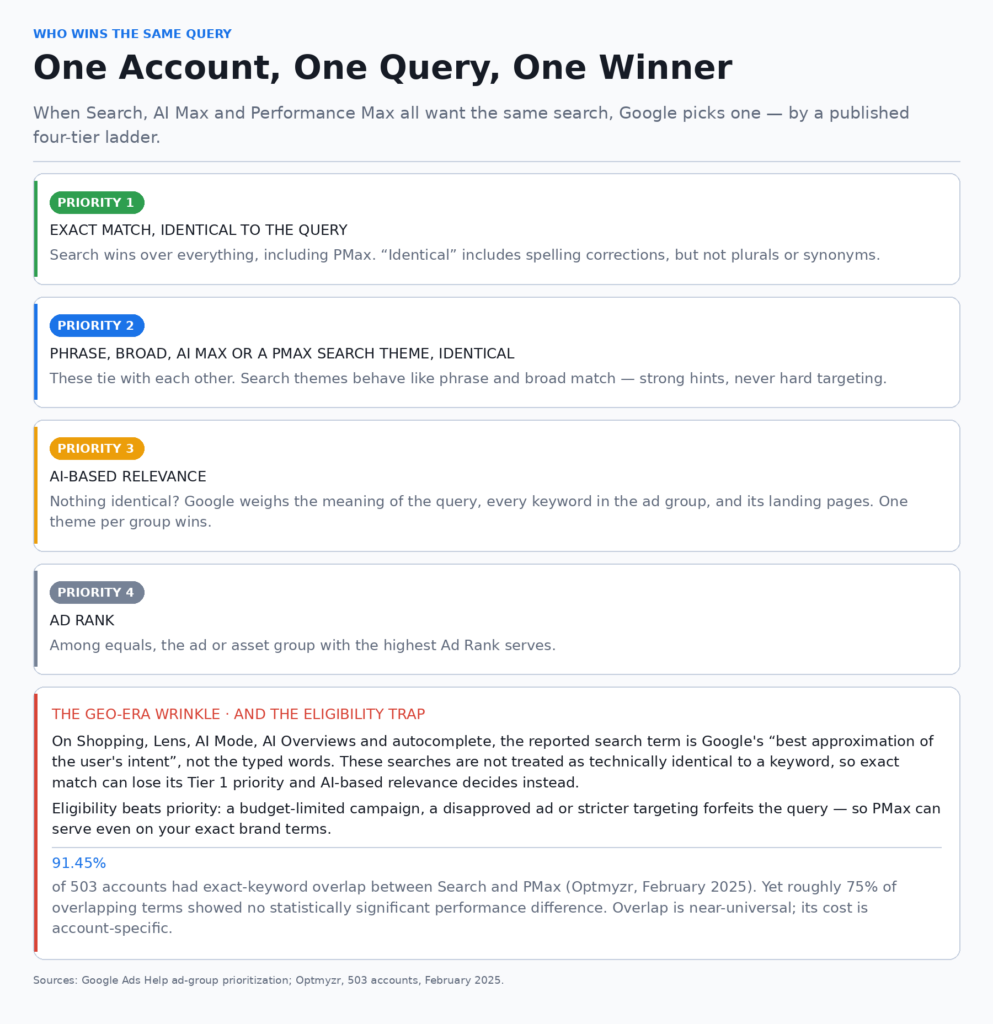
The four tiers Google published
When Search, AI Max and PMax all want the same query, only one of your ads enters the auction. Google’s ad-group prioritization page is refreshingly explicit:
- An exact match keyword identical to the search term wins over everything, PMax included. “Identical” covers spelling corrections — not plurals or synonyms.
- A phrase or broad match keyword (including AI Max), or a PMax search theme, that is identical to the query wins next. These tie with each other.
- AI-based relevance: if nothing is identical, Google weighs the meaning of the query, all the keywords in an ad group and its landing pages, and serves the most relevant group.
- Ad Rank breaks any remaining tie.
Search themes sit in tier two, which is the cleanest way to say what they are: phrase/broad-match-like hints, optional and additive to the queries PMax predicts from your assets, feeds and landing pages. They are not match types, they have no per-term bids, and you get up to 50 per asset group.
The GEO-era wrinkle: AI Mode, AI Overviews and Lens
Here is where 2026 stops resembling 2023. For searches in AI Mode, AI Overviews, Lens and autocomplete, Google says the search term in your report “represents the best approximation of the user’s intent,” not the typed words. These searches are not treated as technically identical to any keyword, so an exact match keyword may not get its tier-one priority — relevance decides instead. And these queries land in aggregate in your search terms report with no filter to separate them. Google describes them as longer, exploratory and conversational; exact and phrase keywords are eligible on direct-commercial-intent queries, while contextual matching belongs to broad match, AI Max, Shopping and PMax.
The practical consequence is quietly brutal for anyone doing GEO work: the phrase your keyword “owns” may not be the phrase the AI actually answered. Build negatives from themes, not single rows.
Eligibility beats priority
Priority only matters among eligible candidates. A budget-limited campaign, a disapproved ad, a low-search-volume keyword or stricter targeting silently forfeits the query, and PMax walks in. Optmyzr’s February 2025 study of 503 accounts (the vendor sells PPC management software, so read it as practitioner research, not a peer-reviewed trial) found exact-keyword overlap between Search and PMax in 91.45% of them — but when the two did serve the same term, the study (which treated anything under a 10% CTR or conversion-rate gap as insignificant) found no significant performance difference in most cases. Overlap is near-universal; its cost is account-specific. Do not let anyone sell you a universal “X% of PMax is wasted” number with an unlabeled axis.
Search themes and audience signals: hints, not handcuffs
If you take one sentence from Google’s audience-signals help page, take this: PMax “may show ads to relevant audiences outside of your signals.” A signal is a starting point for machine learning, not a fence. Feed it first-party data that actually means something — past converters, booked jobs, high-value buyers, site visitors, video viewers — rather than everyone who ever filled a form. On a small budget, a broad signal plus no negatives is a bonfire: the model needs room to explore, and you just gave it the whole internet.
Search themes work the same way. Use them for knowledge the AI cannot scrape from your landing page: a new product line, a seasonal promotion, a niche term your site never mentions. Google added a usefulness indicator in 2025 so you can see whether a theme drove incremental reach or merely echoed what PMax already found. Pull themes from converting non-brand Search terms. Never feed brand terms into a campaign you are trying to keep off brand queries.
Asset engineering: every asset has to stand alone
PMax does not run your ads. It builds ads from a kit, and any part can be paired with any other part. That means a weak asset is not merely weak — it is a weak asset that can be glued to your best headline in front of your best customer.
Google’s text asset specs are exact: up to 15 headlines of 30 characters (minimum 3, recommended 11+, with at least one under 15 characters), up to 5 long headlines of 90 characters, up to 5 descriptions of 90 characters, a 25-character business name, a final URL, two 15-character display-path fields, and one call to action. Fill the kit rather than the minimum: three headlines and the required images will launch, but Ad Strength will be poor and the group will serve on fewer inventories.
Two habits save more campaigns than any bid tweak. First, treat every image as a poster — logo plus one value line that still makes sense with no headline attached. Second, upload your own video in horizontal, square and vertical cuts. Skip it and Google auto-generates one from your images and text and shows it on YouTube, with a story, proof and branding you never approved. The help page even warns that an auto-generated video can feature a different product than the landing page. Set an explicit CTA too; the automated default can render with no CTA at all.
Wait two to three weeks before reading Ad Strength and replacing losers. Changing assets on day three is like repainting a house while the foundation is still wet.
Asset-group architecture and the hybrid model
One asset group is one intent: one offer, one landing page, one coherent set of assets, one audience signal. Mix boots and jackets in a group and you will eventually serve a boot headline over a jacket image. Google’s developer docs allow up to 100 asset groups per campaign, which is a ceiling, not a target — every group shares the budget and bidding, so ten thin groups produce ten noisy reports and none of them exit learning. Split only when creative, landing page or margin genuinely differs.
This is where the hybrid model earns its keep. Keep exact-match Search for the queries you must own — brand, regulated wording, your top-revenue terms, anything needing a specific page — and let PMax hunt the discovery you did not think of: longer questions, YouTube placements, lower-intent Search, the conversational queries AI surfaces now generate. PMax was designed to complement keyword-based Search, not replace it. The moment you ask one campaign to do both jobs, you get a beautiful ROAS and a flat business.
Final URL expansion: an ecommerce gift, a B2B trap
Final URL expansion is on by default. With it, Google may replace your final URL with a more relevant page from your domain and, if text customization is on, generate a dynamic headline, description and even images matched to that page. For a retailer with a 10,000-SKU catalogue, that is a gift: a query for a specific model lands on that model’s page instead of a generic category.
For a B2B site it is a trap. Let it run unchecked and a paid click for “compliance software” can land on a careers page, a login screen or a 2019 blog post, wearing an auto-written headline to match. Page feeds help (with expansion off, the campaign only serves the URLs you provided; with it on, a feed is a hint, not a restriction), but the reliable fix is URL exclusions: list the non-commercial paths you never want, or turn expansion off entirely. Google also recommends generic descriptions for marketplaces and multi-domain accounts, where mismatched headlines are common, and notes changes take 24–48 hours to fully reflect. Check the “Expanded final URL assets” tab and remove anything you would not have signed.
First-party audience exclusions and the new-customer mix
The 2026 audience exclusion is the cleanest expression of a shift that started in 2025. New customer acquisition goals let PMax bid more for people who have not bought before; High Value New Customer Mode, fed by a clean Customer Match list of your best existing customers, asks Google to predict which new users resemble them in lifetime value. Google rolled the high-value mode out of beta to all advertisers in 2025 and cleaned up the new-versus-returning report so the “Unknown” bucket stopped muddying every chart.
Two honest caveats. A thin or stale list gives the model almost nothing, and mislabels loyal customers as prospects. And the incremental value you assign to a new customer is a bidding signal, not a deposit — Google adds it on top of the real order value, so your dashboard ROAS rises while your bank balance does not. Reconcile against your own backend. Then read the new-versus-returning segment, not the blended number.
Reading the reports without overclaiming
Three traps live in the reporting UI. First, asset rows are not additive. Each asset in a served ad logs its own impressions, clicks, cost and conversions; Google warns the asset table totals can exceed the campaign, and CTR, CPC, CPA and ROAS at asset level are only approximations of assets shown together. Compare assets against each other inside a group; keep the campaign and asset-group views as your source of truth.
Second, “Conversions” and “Results” are different columns in the channel report — the former includes secondary actions you track, the latter counts primary conversions grouped by goal. Screenshot the wrong one and you will brief a fiction to your CFO.
Third, placement reports are for brand safety, not incrementality. Network segmentation tells you where ads showed; it does not tell you whether those impressions created demand. Google says as much. Use account-level placement exclusions and content suitability for adjacency, then go find a real holdout for the causal question.
The symptom clinic: four diagnoses
High ROAS, flat revenue. Assume credit capture until proven otherwise. Pull the search terms report, measure branded-query share, and check the new-versus-returning split and engaged-view conversions. Apply brand exclusions, keep the brand Search campaign funded, and watch total account revenue for two to four weeks. If the total holds while PMax spend falls, you were paying for your own customers.
Great lead volume, terrible sales. Do not scale on form CPL. Define the conversion at a qualified stage, import offline outcomes from your CRM, seed audience signals with people who actually bought, and add form validation and negatives before launch. Changing the bid strategy, budget or assets will not fix lead quality — the model is faithfully optimizing the wrong goal.
A campaign that refuses to spend. Work the boring checklist: restrictive CPA or ROAS targets, a thin or disapproved feed, policy disapprovals, missing required assets, a “Limited by budget” flag, or too short a learning window. The channel report’s diagnostics will often name the missing business name or square image that locked a surface out.
Efficiency that decays after a good month. Check the channel mix shift and the search terms first, not the bid. A feed error can move budget from Shopping to YouTube overnight. Change one lever at a time and give it one to two weeks to settle; Google’s own help recommends exactly that.
Measurement discipline: proving incrementality
Reconcile beyond the platform
Platform reporting grades its own homework. Your job is to keep a second ledger: GA4 and CRM outcomes, contribution margin rather than revenue, and a lagged read for long sales cycles. Import qualified leads and closed-won values back as offline conversions. Watch conversion delay — a campaign judged on Tuesday for a sale that closes next Friday will always look worse than it is.
The holdout, and when you can finally run one
For years the honest answer to “is PMax incremental?” was “run a geo or time-based holdout, if you have the volume.” Compare matched regions or a clean pre/post window, hold everything else frozen, avoid obvious seasonality boundaries, and judge total conversions, revenue and margin — not either campaign’s column. Never abrupt-pause a campaign on 1 December and call the drop a verdict.
October 2026 changed the tooling. Google opened user-based Conversion Lift to Search and PMax without a representative: eligible accounts need at least 1,000 observed conversions (supplementary conversions do not count), a $5,000 minimum campaign budget and a compatible conversion action, with one lift study per campaign at a time. Google recommends a 10–20% holdback, studies longer than 14 days (it reports up to a 17% understatement of absolute lift in shorter studies with long conversion lag), and aiming for 90% study power. Google’s PMax uplift experiment, a 50/50 split, remains a free starting point. These are the first official instruments that separate “the ads got credit” from “the ads caused the sale.” Use them before you set another annual budget on a self-reported ROAS.
A note if you buy in China too
The same box wears a different logo there. Baidu’s AI delivery and Douyin’s Qianchuan automation run the identical bargain — reach in exchange for opacity — and the identical discipline applies: fence the brand, feed clean conversion outcomes, judge the total. The labels change; the ledger does not.
The October 2026 twist: two dials and a holdout
One genuine correction to the old “you cannot control channel spend at all” rule. In October 2026 Google began rolling out Channel Prioritization and Budget Allocation across Search, Shopping, PMax and Demand Gen. You can tag inventory High or Low priority (everything defaults to High), and set a best-effort daily budget allocation percentage for Low-priority channels. A 5% allocation on a $1,000 average daily budget aims to keep that channel at or below $50 a day; 0% prevents spending there. For PMax the selectable tiers are “Google channels” (Search, YouTube, Maps, Gmail and Discover bundled together), Search partners, and GDN.
Read the fine print before celebrating. The percentage is of the configured daily budget, not actual spend, and Google explicitly calls it best-effort — daily spend may exceed it. On Target CPA or ROAS campaigns that are not budget-limited, priority tiers generally change nothing; the allocation percentage is the lever that actually bites. And the bundling is the real limit: you can push budget away from partners or GDN, but you still cannot tell PMax to favour Search over YouTube. If that separation matters, it belongs in campaign structure, not a setting.
One more date worth circling: in February 2027 Google retires the current Display Expansion spend behaviour on Search campaigns, and recommends setting GDN to Low priority with a 50% allocation to keep today’s configuration. If you run Search with Display Network on, do not let that migration happen to you by default.
Conclusion: run the hybrid, judge the account
PMax in 2026 is neither the black box of 2022 nor the steerable campaign its marketing sometimes implies. It is a cross-channel allocation engine with excellent windows and very few doors. The windows are worth using: exclude your brand on day one, load negatives, supply a complete asset kit, decide Final URL expansion deliberately, point first-party data at acquisition, and read channel and placement reports for what they are. The missing doors are worth designing around: exact-match Search for the queries you must own, PMax for the queries you never imagined, and a holdout for the only question that matters.
Then stop asking the campaign how it did. Ask the account. Total revenue, new-customer mix, contribution margin, incremental lift. A campaign that reports heroics while the bank balance stays flat is not broken — it is just answering a question nobody should have asked.