Open two pricing tabs, put them side by side, and the argument seems to end before it starts. Both vendors now ship pipelines, sequences, forecasting, quoting, and a roster of AI agents with confident names. The feature grid, that tired spreadsheet of checkmarks, has converged to the point of parody. So why do two companies selling what looks like the same product end up with such different customers, such different invoices, and such different regrets?
Because the decision moved underneath the features. It lives now in three places nobody puts on a demo slide: the billing unit, the data-model gate, and the people you have to hire to keep the thing running. There is a footnote on HubSpot’s own pricing page that quietly detonates the assumption that it is the cheap one. There is a tier-name change at Salesforce that will make last year’s quote unreadable. And there is a line in every three-year model — labour — that dwarfs every seat price on either page.
Price your operating model, not your seat. Here is how.
Two centers of gravity: 20% of a market vs 306,446 customers
Start with who each vendor actually builds for, because that tells you more than any feature list.
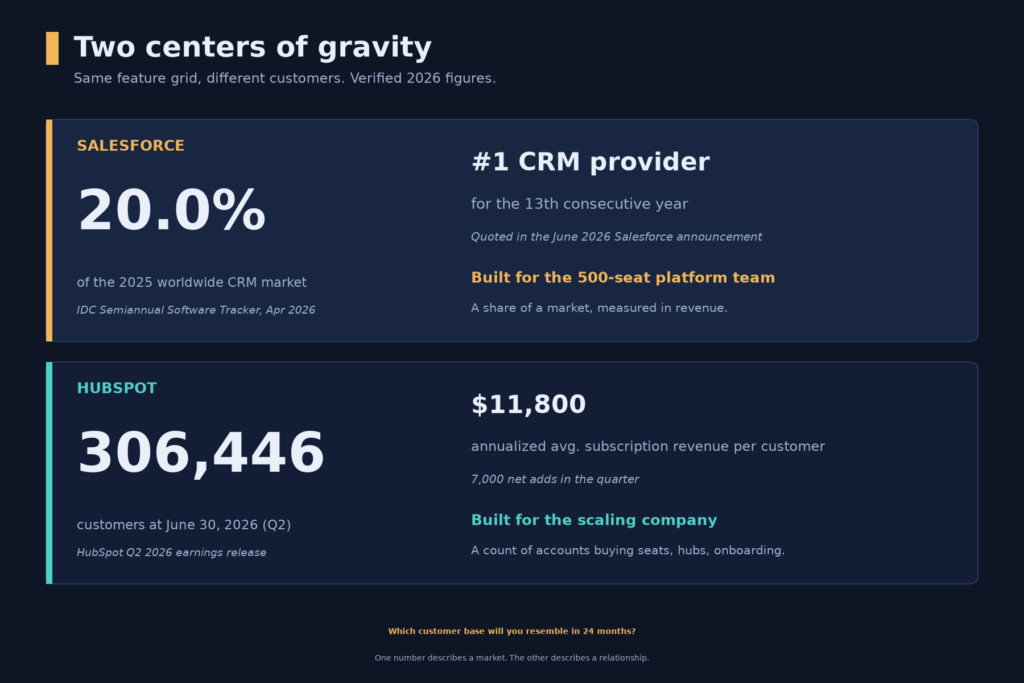
According to IDC’s Worldwide Semiannual Software Tracker published in April 2026, and quoted in Salesforce’s own June announcement rather than in an independent IDC release, Salesforce led the worldwide CRM market in 2025 with a 20.0% share. It was the thirteenth consecutive year at the top. IDC’s definition of that market is broad — sales productivity, campaign management, customer service, contact centres, advertising and digital commerce — so read the number as a statement about revenue across a category, not a headcount of users.
Now the other number. HubSpot’s Q2 2026 earnings release reports 306,446 customers at June 30, 2026, with roughly 7,000 net adds in the quarter, and average subscription revenue per customer of roughly $11,800 — a rounded, annualized KPI the company discloses each quarter, not a per-quarter bill and certainly not a price. The filed six-month average works out to $11,799, and by Q3 it had already ticked up to $12,038. Treat it as a direction, not a decimal.
One number describes a market. The other describes a relationship — 306,446 separate accounts buying seats, hubs and onboarding. Salesforce is engineered for the org with five hundred revenue seats, several product lines and a sales-ops function. HubSpot is engineered for the company that is still becoming that org. The most useful question in this whole comparison is not which tool is better; it is which of these two customer bases you will resemble in twenty-four months. Get that wrong and you will buy headroom you never use, or outgrow a system eighteen months after the confetti.
The verified pricing ledger (and the retired-tier trap)
Let us put the actual numbers on the table: all USD, all list, all checked against vendor pages in November 2026, all annual billing unless noted.
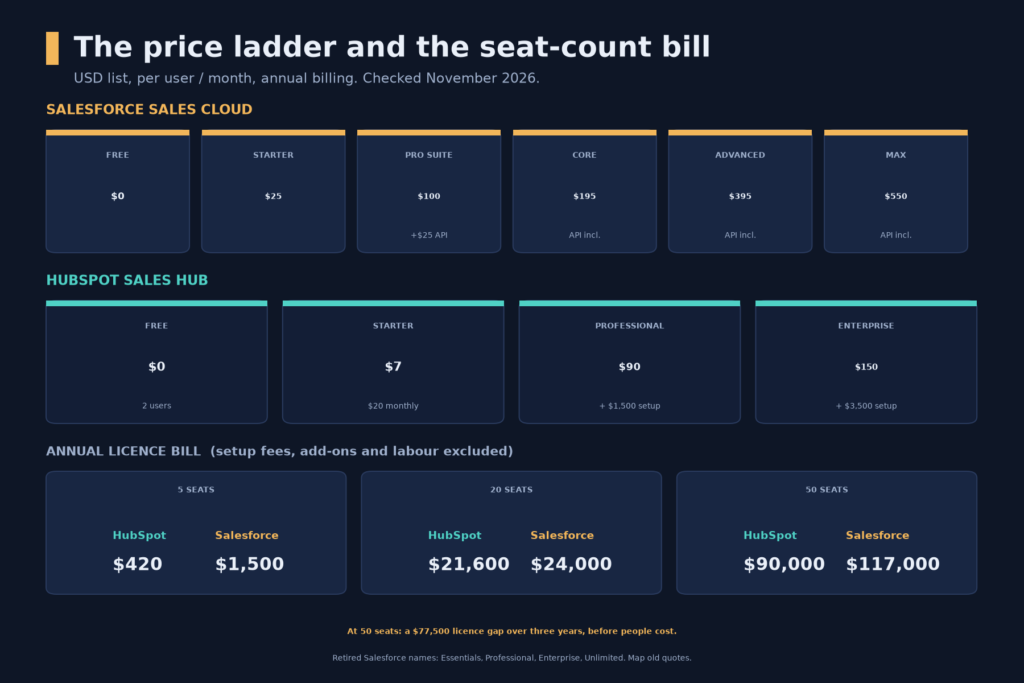
Salesforce Sales Cloud runs Free Suite at $0, Starter Suite at $25, Pro Suite at $100, then Core at $195, Advanced at $395 and Max at $550 per user per month. Those last three are new. Salesforce launched them on 3 September 2026, bundling in Agentforce capabilities, Slack, analytics, security and the Premier Success Plan, along with an allowance of Flex Credits — 500,000 on Core, 1 million on Advanced and 2.75 million on Max per org per year.
That launch created a trap for anyone recycling an old comparison. The names Essentials, Professional, Enterprise and Unlimited have been retired for Sales Cloud. A quote you signed in 2025 naming Enterprise at $175 a seat does not map cleanly onto Core at $195, and anyone who tells you otherwise is guessing. If a consultant sends you a tier grid with the old labels, ask them to redo it. This is not pedantry; it is the difference between a renewal and a reimplementation.
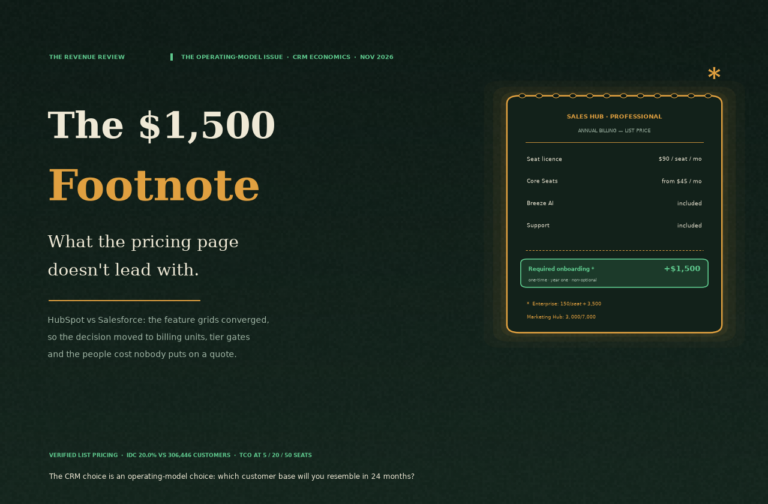
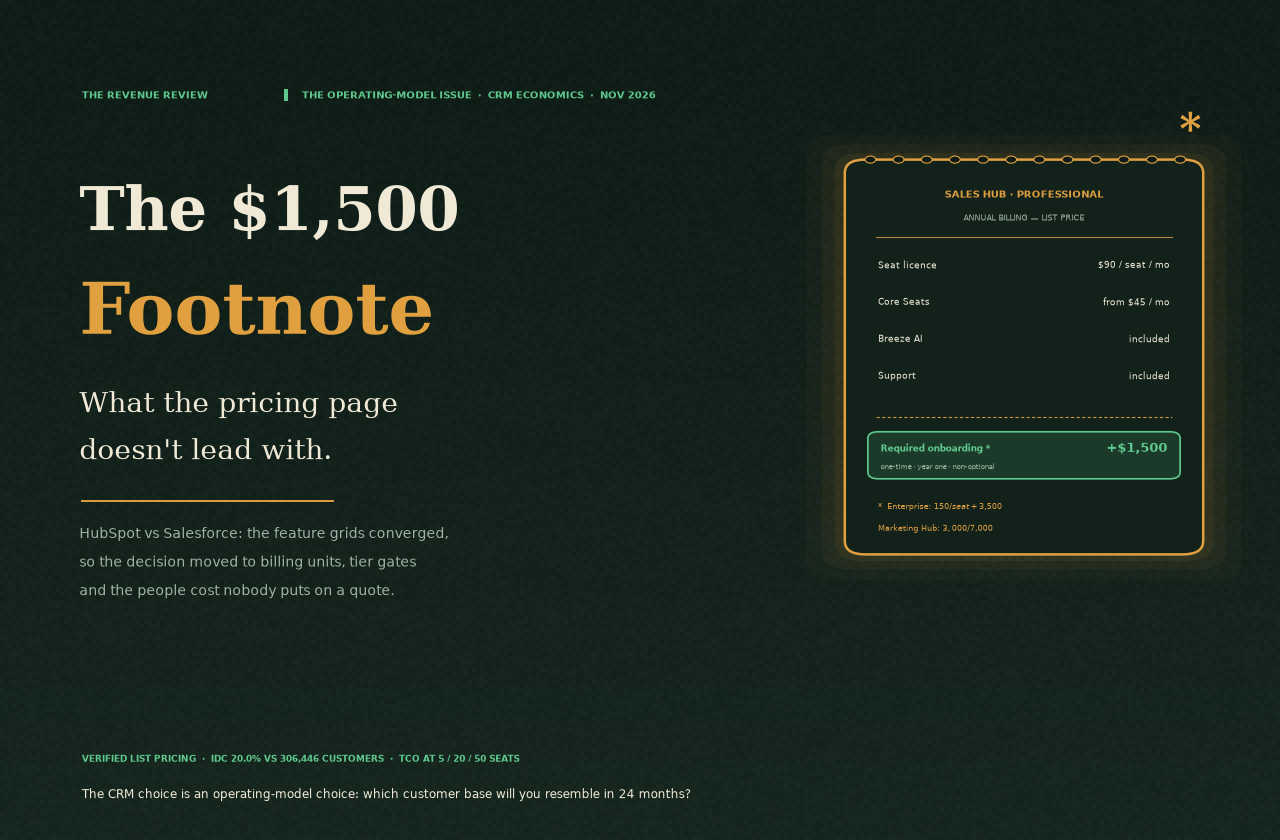
HubSpot Sales Hub posts Free for up to two users, Starter from $7 a seat a month on annual terms ($20 if you pay monthly), Professional at $90 a seat ($100 monthly), and Enterprise at $150 a seat, annual only. Nice, tidy, ascending. Then you read the asterisk.
The footnote that flips the cheap assumption
HubSpot’s pricing page states that the price shown does not include a required, one-time onboarding fee. On Sales Hub that is $1,500 for Professional and $3,500 for Enterprise. On Service Hub it is the same. On Marketing Hub it is $3,000 for Professional and $7,000 for Enterprise — a figure worth pausing on, because plenty of secondary articles still quote $6,000 for Marketing Hub Enterprise. HubSpot’s own Marketing Hub onboarding page and pricing page both say $7,000. Go with the vendor.
Required is doing heavy lifting in that sentence. This is not an optional workshop you can decline, and it lands in year one regardless of how experienced your team is. At five seats on Professional, a $1,500 fee nearly quadruples the first-year software bill. The footnote is small; the effect is not.
What changed under Salesforce’s hood
Two corrections to the folklore. First, Premier Success Plan is priced at 30% of net licence fees on older and lower tiers, but it is bundled into Core, Advanced and Max as of the September 2026 editions. Do not add a 30% support line to a Core quote — you will double-count. Second, Salesforce CPQ, the old SteelBrick managed package, went end of sale in March 2025; its successor is Revenue Cloud, listed at $150 per user per month for Growth and $200 for Advanced, on top of an underlying Sales Cloud licence. If someone is still quoting CPQ at $150 as a live SKU, the number happens to survive but the product name does not. The migration is a reimplementation, because the two are built on different object models.
The 5 / 20 / 50-seat TCO table
Now the arithmetic, and I want to be blunt about what it excludes. These are licence-only, list-price, annual figures, computed straight from the published rates. No discounts, which enterprise buyers will get; no tax; no add-ons; no implementation; no human beings.
At five seats, HubSpot Starter is $420 a year against Salesforce Starter Suite at $1,500. At twenty seats, HubSpot Professional is $21,600 a year (plus that $1,500 onboarding in year one) against Pro Suite at $24,000. At fifty seats, HubSpot Enterprise is $90,000 a year (plus $3,500 onboarding) against Salesforce Core at $117,000.
Look at how the story changes as the team grows. At five seats, HubSpot is cheaper by a factor of three and a half. At twenty, the gap is almost gone — $2,400, less than the onboarding fee. At fifty, Salesforce is $27,000 a year more on licences alone, which across three years, net of HubSpot’s one-time fee, is a $77,500 gap. So is HubSpot the cheap one? At small seat counts the onboarding fee makes it briefly expensive; at large seat counts the per-seat rate makes Salesforce expensive. The answer depends entirely on where you sit, which is precisely the point.
Read the exclusions before you celebrate
Add the things the table deliberately leaves out and the picture moves again. Give ten of those fifty Salesforce users Revenue Cloud Growth to build quotes and you add $18,000 a year, taking the three-year Core-plus-quoting bill to $405,000 against HubSpot Enterprise’s $273,500 — a $131,500 difference before a single salary. Then add the implementation project and, on the Salesforce side, a dedicated administrator. On the HubSpot side, add the fact that Enterprise is where custom objects live and that a serious outbound motion will eventually want a higher sequence cap. The licence line is the smallest number in this model. It is also the only one printed on the pricing page, which is exactly why everyone argues about it.
Price marketing separately: platform fees vs contact blocks
Here is a mistake I keep watching teams make: they price the sales CRM and assume marketing rides along. It does not. The two vendors bill marketing on completely different units.
HubSpot Marketing Hub is a flat platform fee by contact tier — $800 a month on Professional and $3,600 a month on Enterprise at the entry contact tier, with additional Core Seats starting around $45 and $75 a month respectively. Your marketing contacts are the meter; the platform fee is the meter’s casing. Salesforce’s B2B automation product, Marketing Cloud Account Engagement, starts at $1,250 a month billed annually for up to 10,000 contacts on the Growth edition, with higher editions at $2,500, $4,000 and $15,000, and contact blocks you buy as you grow.
One is priced by database size with seats as a rounding error. The other is priced by a contact block with a comparatively steep floor. If your list is 200,000 and your sales team is twelve, model these two lines on their own spreadsheet before you let anyone blend them into a per-seat number. And remember Marketing Hub’s own required onboarding — $3,000 or $7,000 — is a separate line from Sales Hub’s. Buy Sales and Marketing Professional together and you can be looking at $4,500 in onboarding before a single email goes out.
Billing-unit literacy: seats, Core Seats, and marketing contacts
You cannot compare two invoices until you can read the nouns. Salesforce sells per-user licences: every human who logs in is a unit. HubSpot sells a mix. Paid Sales Hub or Service Hub seats carry the full rate; Core Seats are cheap, read-oriented seats for people who need to see the CRM but not its advanced tools; marketing contacts are a completely separate count that has nothing to do with how many employees you have.
The annual-versus-monthly delta matters too. HubSpot Starter is $7 a seat annual and $20 monthly — nearly triple for the privilege of flexibility. Professional is $90 versus $100. Salesforce’s higher editions are annual by default, and the vendor says most products use annual contracts. If your finance team models a monthly number and signs an annual one, or vice versa, you have not made a rounding error; you have made a different purchase.
So ask for a quote in the exact unit you will be billed in. How many paid seats? How many Core Seats? How many marketing contacts, at which tier, today and in eighteen months? An estimate at today’s contact count is not a budget; it is an opening bid.
Data-model gates: the custom-object line you cannot uncross
Features converge. Data models do not. This is where the two products stop being comparable and start being architectural.
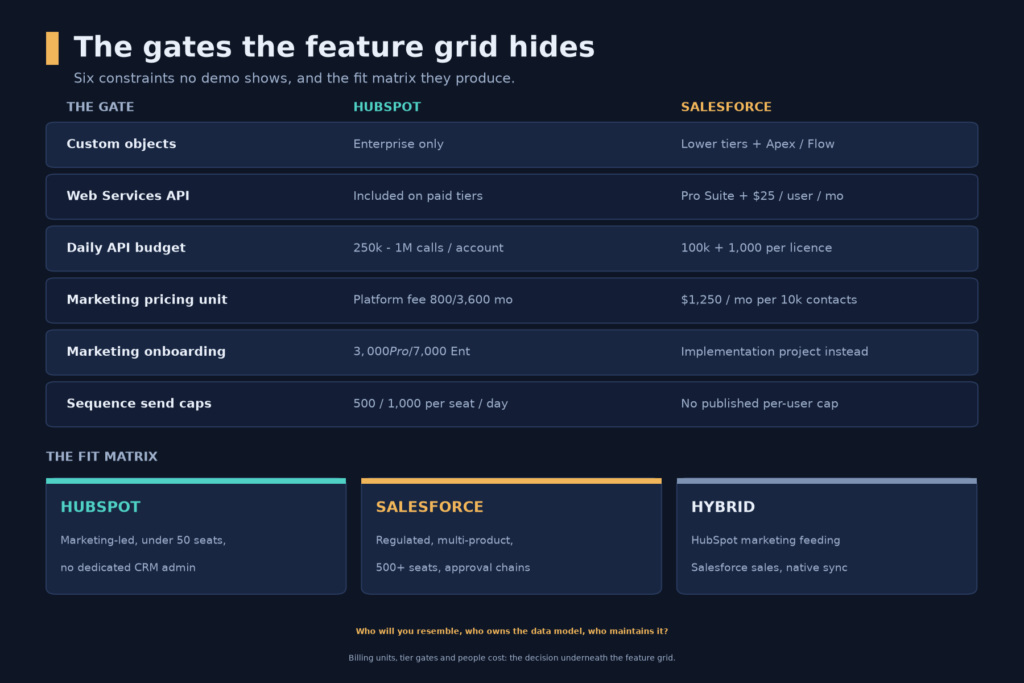
HubSpot’s own knowledge base is unambiguous: an Enterprise subscription is required to use custom objects. Not Professional. Not Starter. One Enterprise subscription on any qualifying hub unlocks them across the portal, but there is no partial state, no workaround inside HubSpot, no add-on that buys you a single extra record type. Custom-object workflows, lists and reports all sit behind the same gate. Move from Professional to Enterprise to model a genuine one-to-many relationship — subscriptions per account, properties per agent, courses per student — and you have just repriced the entire decision from $90 to $150 a seat.
Salesforce plays the opposite game. Custom objects, Apex code and Flow automation are available from lower tiers, and the platform’s whole premise is that almost any business process can be modelled if someone is willing to build it. That ceiling is real. So is the maintenance bill attached to it.
HubSpot’s professional-tier escape hatches are honest but limited: custom properties on standard objects for one-to-one facts like contract end dates, and custom association labels to describe a relationship without giving it its own record. They cover a surprising amount. They do not cover a child record with its own lifecycle. Decide whether you need that before you fall in love with a Professional quote.
The API add-on and the fine print
The fine print bites on the Salesforce side, oddly enough at the cheaper tier. Pro Suite lists the Web Services API as an additional $25 per user per month; from Core upward it is included. An API-heavy team on Pro Suite is therefore paying $125 a seat, not $100, and still hitting a five-flow-per-org ceiling that a real integration will trip over before the API does. Core includes the API, Premier Success, more automation headroom and forecasting — which is why the $95 gap between Pro Suite and Core is rarely the $95 question it appears to be.
Automation and published limits as integration design inputs
Treat published limits as architecture, not trivia. They are the cheapest way to find out whether your integration will survive contact with reality.
Salesforce’s developer documentation sets a daily API allocation of 100,000 requests per org plus 1,000 per Salesforce licence on Enterprise (5,000 on Unlimited), shared across every integration in the org, on a rolling twenty-four-hour window. One chatty sync can starve everything else. HubSpot’s usage guidelines scale private-app limits by tier: 100 requests per 10 seconds and 250,000 a day on Free and Starter, 190 per 10 seconds and 625,000 a day on Professional, and 190 per 10 seconds with 1 million a day on Enterprise. The CRM Search API carries its own, much tighter ceiling of five requests per second. Neither set of numbers is good or bad in the abstract; they are simply different shapes of headroom, and a sync designed for one will misbehave on the other.
Email is the same story. HubSpot documents a connected-inbox daily cap of 350 for free Gmail, 1,000 for Google Workspace and Microsoft 365, and a separate per-seat sequence limit of 500 sends a day on Professional and 1,000 on Enterprise, measured on a rolling window that counts scheduled follow-ups, not just today’s sends. Salesforce does not publish a comparable per-user daily cap. If your whole outbound motion rests on a five-step sequence, that 500 is a capacity plan, not a setting. Enrol 200 contacts and you have queued up to 1,000 sends against future days — your launch will meter out over a week whether you intended it to or not.
Two AI layers, two commercial logics: Breeze vs Agentforce
Both vendors will tell you they have become agentic platforms. They have, but they mean different things, and the commercial logic underneath is the part that shows up on the invoice.
HubSpot Breeze is a built-in layer: Breeze Copilot in the sidebar, task-oriented Breeze Agents for prospecting, customer service and content, and Breeze Intelligence for enrichment and buyer-intent signals. It reads from the same unified CRM records your team already uses, so there is no separate data platform to stand up first. The pitch is accessibility — AI a marketing or sales generalist can switch on this week. Consumption is metered in HubSpot Credits, with a monthly allowance bundled into paid plans.
Salesforce Agentforce is a configurable agent layer built on the Atlas Reasoning Engine, designed for autonomous, multi-step work across Salesforce clouds and, for full grounding, Data 360. It reaches further and rewards governance, guardrails and admin capacity. It is sold as an add-on on Core and Advanced and included in Max, with usage metered in Flex Credits. The September 2026 editions bake in a credit allowance; beyond it, you are in consumption territory.
Which is more usable? Wrong question, and vendors love it because it has no answer. The right one is cheaper to ask: do you have the admins and the data maturity to configure a deep agent, or do you need something useful on Monday? Depth-with-configuration versus included-and-instant. And here is the unglamorous truth: both are only as good as the records they read. Point either at duplicate, stale, half-filled data and it will be confidently wrong. Budget for data hygiene before you budget for agents.
The people cost: the line that dwarfs every seat
Here is where the comparison stops being about software. Implementation and administration are practitioner-consensus ranges rather than vendor-published figures, so treat them as directions with a caveat — but the direction is consistent across implementers who work with both platforms.
A HubSpot implementation for a small or mid-sized team typically runs two to six weeks self-serve, or six to twelve weeks with a partner, and the platform is usually maintained by a RevOps generalist alongside other duties. A Salesforce Enterprise implementation for a comparable team runs two to six months, can stretch to nine or twelve for complex scopes, and at mid-market scale almost universally calls for a dedicated administrator — a full-time role, not a fraction of one. Partner implementation fees commonly land in the tens of thousands on the Salesforce side versus a fraction of that on HubSpot’s.
That salary is the line nobody puts in the spreadsheet, and it is bigger than every seat price above it. It is also a turnover risk: a lightly documented Salesforce org degrades fast when its admin leaves. An under-resourced Salesforce instance becomes a data graveyard; a well-implemented HubSpot beats a badly implemented Salesforce every time. Keep the symmetry in view, though. Every unit of Salesforce flexibility is a unit of ongoing governance, and companies that buy depth they never use pay enterprise overhead for SMB outcomes. Conversely, HubSpot’s constraints quietly enforce a process discipline that a lot of scaling teams badly need. Neither vendor is the safe choice if nobody owns the build.
Migration realities in both directions
Assume you will move eventually, and the data model decides how much it hurts.
Moving from Salesforce to HubSpot is generally the smoother direction: the simpler target model means fewer mapping decisions, and a lightly customised org under roughly eighty seats can often be migrated inside an eighteen-month payback on operational savings. Moving the other way takes longer, because you are splitting unified records into a Lead/Contact model and rebuilding automation from scratch. Either way, expect activity fidelity loss — the tidy timeline of calls, emails and notes rarely survives a migration intact — and expect bundled tools to become integrations you now have to own. A feature that was native becomes a connector, a sync, and a small maintenance task forever.
The practical move before any demo: map your real revenue process on paper. Deal stages, lead lifecycle, handoff criteria, the three reports your CFO actually opens. That clarity will do more for the decision than any sandbox, and it will make whichever implementation you choose faster.
The fit matrix (and the hybrid that keeps both)
So where does all of this land?
Marketing-led, under roughly fifty revenue seats, no dedicated CRM admin, inbound and content at the core: HubSpot. Regulated, multi-product, five hundred seats and up, multi-stage approvals, territories, partner channels, an industry cloud you cannot replicate: Salesforce. And the pattern that resolves more arguments than it should: the hybrid. Marketing keeps HubSpot’s tooling, sales runs on Salesforce, and a mature native integration carries the handoff. It is a well-worn architecture, not a compromise you should be embarrassed about.
The gates are the quick test. Do you need custom objects on a Professional budget? That is a reprice, not a checkbox. Is the Web Services API central to your stack? Then Pro Suite was never really $100. Will your sequence volume outrun 500 sends a seat per day? That is a capacity question, not a feature question. And does anyone on your team actually own the data model six months after go-live?
Measurement, hygiene, and the metric you should actually watch
Finally, a small honest asymmetry, because it says something about how the two vendors talk to you.
Salesforce’s own help documentation on Apple’s Mail Privacy Protection is unusually direct. It warns of inflated open rates, of automation firing on non-human opens, and it says, in its own words, that the company strongly recommends moving away from using email opens as a barometer for engagement. Its Trailhead material goes further and tells marketers to switch to click engagement and rebuild their baselines. That is a vendor telling you its metric is broken. It is worth more than a dozen dashboard features.
Neither platform, as far as their published documentation goes, ships a clean reply-latency metric — how long it takes a human to write back — despite that being the number a sales leader actually cares about. If you take one measurement idea from this article, make it that: watch reply latency and meetings booked, assign an owner to CRM hygiene, and treat open rate as weather, not as truth. A CRM full of stale duplicates will make any AI layer confidently useless.
And a mirror, briefly, for teams reading this from China: the same decision gap — billing units, data ownership, who maintains the system — is being contested there by domestic CRM and WeCom-based SCRM vendors rather than by these two names. The mechanics travel even when the logos do not.
In short: the three questions to take into the demo
The feature grid converged; the operating model did not. Both CRMs will sell you pipelines, sequences, forecasting and AI agents. What they will not sell you is a decision about billing units, tier gates and the people who keep the records clean.
So take three questions instead of a checklist. Which customer base will you resemble in twenty-four months — the 20% share of a market or one of 306,446 scaling accounts? Who owns the data model, and have you priced the tier that unlocks it? And can your team actually maintain what you are about to buy, after the implementation partner goes home? Answer those honestly and the seat price becomes what it should have been all along: the smallest line in the model.