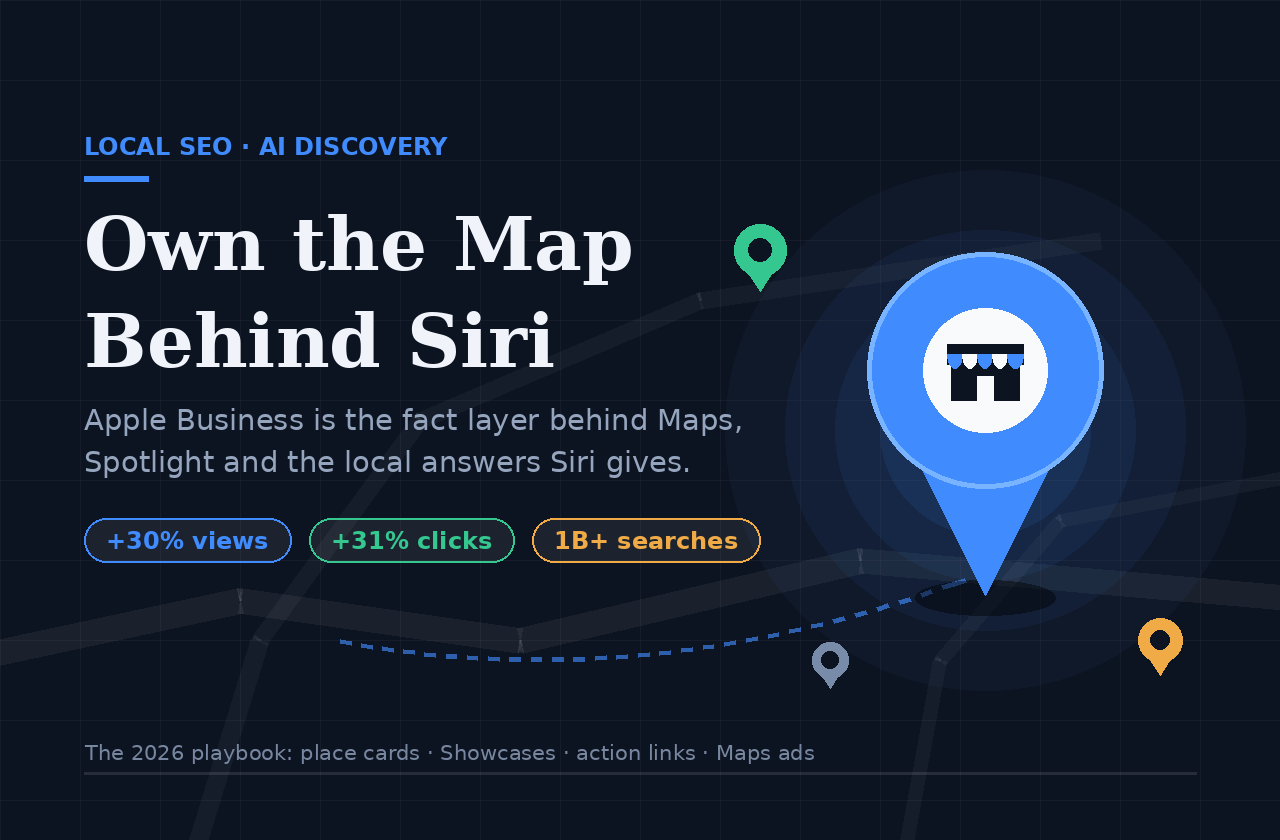
On April 14, 2026, Apple quietly retired one of local marketing’s most underrated tools. Apple Business Connect — the free dashboard where you claim your Apple Maps listing — was folded into a bigger platform called Apple Business, alongside the device-management and small-business bundles Apple used to sell separately. The name changed. The opportunity got larger. Because what you are really editing in that dashboard is not a map listing. It is the set of local facts that Siri speaks aloud, Spotlight puts on the home screen, Safari renders in search results, and Apple’s AI features draw on when someone asks where to eat, shop or book.
Most local marketers have spent a decade tuning everything for Google. Meanwhile Apple has been building a second local discovery machine — one with different ranking fuel, a different review supply chain, and, as of August 2026, its own ad auction. This piece walks through what is verified, what changed, and how to work the surface without wasting a quarter on tactics that do nothing there.
The Numbers That Matter — and Who Actually Says Them
Let’s start with evidence, because this topic floats on a lot of recycled statistics. Here is what survives scrutiny.
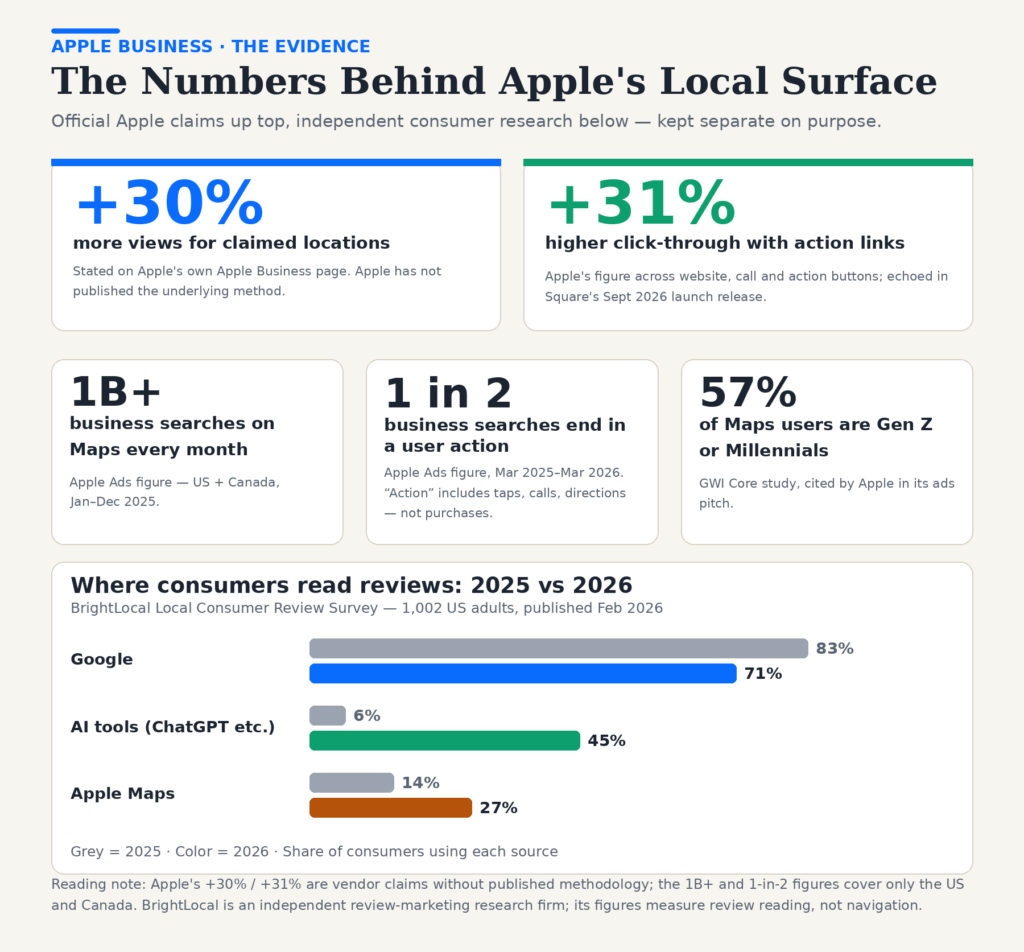
Apple’s own Apple Business page makes two claims, verbatim: claimed businesses get 30 percent more views, and action links increase click-through rate by 31 percent across website, call and action buttons. Those are vendor figures — Apple publishes no methodology — but they are first-party claims on Apple’s live site, not telephone-game numbers from a blog. Square’s September 24, 2026 launch release for its Apple Business integration repeats both, with footnotes pointing back to Apple’s page.
Scale comes from Apple’s ads pitch, and the footnotes matter: more than one billion relevant business searches happen on Apple Maps every month — measured in the US and Canada across January–December 2025 — and one in two business searches ends in a user taking action, measured March 2025 to March 2026. “Action” here means taps, calls, directions and similar engagement, not purchases. Treat it as an intent signal, not a conversion promise. Apple also cites a GWI Core study putting Gen Z and Millennials at 57 percent of Maps users — which should retire the lazy assumption that Apple Maps skews old. For the installed base, Apple’s January 2026 earnings release confirms more than 2.5 billion active devices across all its products; it has never broken out iPhones alone, so treat any “X billion iPhones” figure you see as an estimate.
The independent counterweight is BrightLocal’s 2026 Local Consumer Review Survey — 1,002 US adults, published February 2026 by a review-marketing research firm (a vendor, but one whose survey methodology is public). Its finding: the share of consumers reading reviews on Apple Maps nearly doubled in a year, from 14 to 27 percent, while Google’s share slipped from 83 to 71 percent and AI tools jumped from 6 to 45 percent. Discovery is fragmenting. Apple Maps is one of the fragments gaining ground.
You may have seen a viral statistic that 58 percent of US businesses have never claimed their Apple listing. We tried to trace it to an original study and could not — every path leads back to vendor blog posts citing each other. So we will not use it. The honest version of the claim is smaller and still useful: plenty of place cards sit unclaimed, complete profiles are rarer than they should be, and Apple itself is paying businesses to show up.
One Place Card, Every Apple Surface
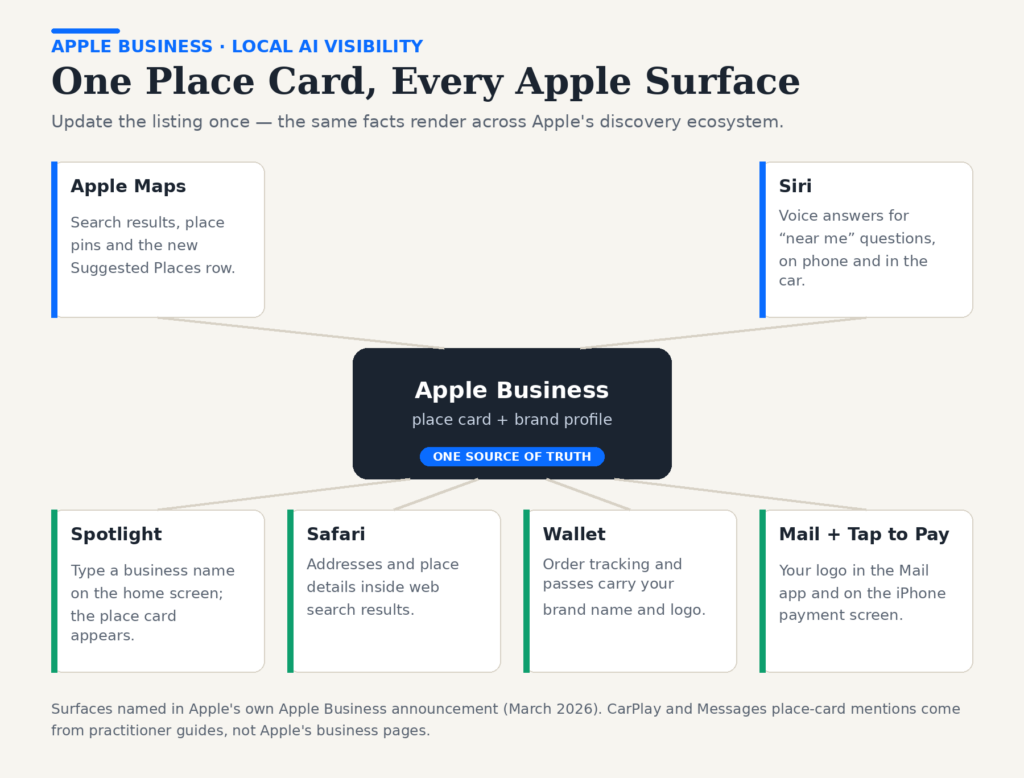
Think of your Apple Business profile as a single fact sheet with many printers. Apple’s own launch announcement names the outputs: Maps, Siri, Spotlight, Safari, Wallet order tracking, branded Mail, and the Tap to Pay payment screen. Practitioner guides add CarPlay search and location shares in Messages — plausible, widely reported, but not named on Apple’s business pages, so treat them as bonus reach rather than promises. DuckDuckGo’s map results also run on Apple’s map data, which extends your listing’s footprint beyond Apple’s own apps.
The practical implication: an hour fixing your hours, categories and photos in Apple Business is not an hour spent on “the Apple Maps channel.” It is an hour spent on every Apple surface that answers a local question. When someone asks Siri for a nearby coffee shop with parking, the assistant is filtering on the attributes you did or did not fill in. When your hours are wrong, they are wrong in the car, on the wrist, and in the search bar — simultaneously.
The Apple Business Rename: What Actually Changed
Three products became one. Apple Business Connect (listings and brand), Apple Business Manager (device management) and Apple Business Essentials (the small-business bundle) merged into Apple Business, free, in more than 200 countries and regions. Existing Connect data — claimed locations, place cards, photos, account details — migrated automatically, and the old products were retired. If a tutorial tells you to visit businessconnect.apple.com, the workflow still maps over; the console now lives at business.apple.com under Brands and Locations.
Two footnotes worth knowing. First, the companion app and the email/calendar features require iOS 26 or macOS 26 — the listing management itself works in a browser. Second, per Square’s launch release, Siri AI features are not available initially in the EU on iOS, iPadOS and watchOS. If your footprint is European, your place card still renders across Maps and Spotlight; the voice-AI layer arrives on a different clock.
Apple’s Ranking Signals Are Not Google’s
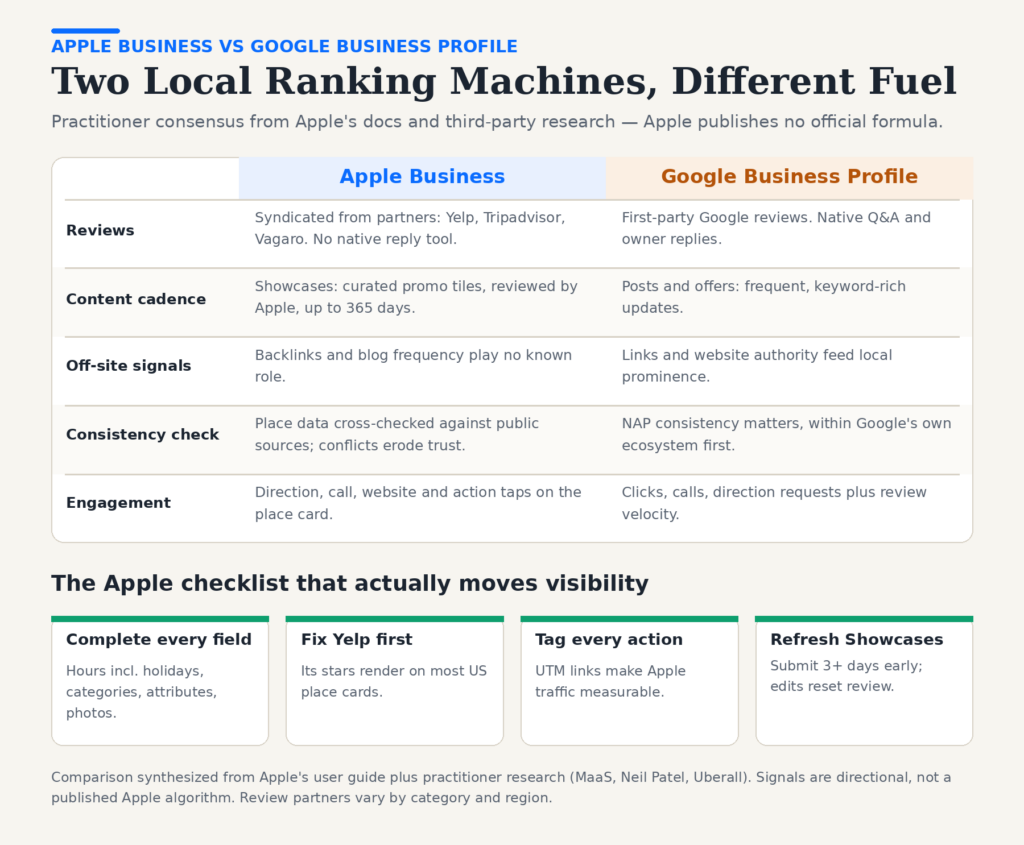
Apple publishes no ranking formula. What follows is the practitioner consensus synthesized from Apple’s documentation and third-party research — directional, not gospel. The signals that consistently matter: place-card completeness (including holiday hours), consistency of your name/address/phone against other public sources, reviews on Apple’s partner platforms, engagement taps (directions, calls, website, actions), photo quality, and fresh Showcases.
What is conspicuously absent: backlinks, blog publishing frequency, and on-site schema density. The link-building lever you pull for Google does essentially nothing here. Apple’s machine wants to know whether your business is real, current, and well-regarded on the platforms it trusts — not how many domains mention you.
The Most Underrated Factor: Reviews You Don’t Host
Here is the structural quirk that changes your workload: Apple does not run a Google-style native review platform. Written reviews on US place cards mostly come from Yelp; hotels, restaurants and attractions lean on Tripadvisor; beauty and wellness businesses often show Vagaro ratings and a Schedule button. Apple’s own contribution is a thumbs-up/thumbs-down recommendation system with user photos, live since the iOS 14 era — no stars, no text, and crucially, no reply box for you.
So your Apple reputation is a syndication of reputations you build elsewhere. Want better stars on Apple Maps? Work Yelp. Hospitality? Tripadvisor. Salon or spa? Your booking platform’s profile is doing double duty as your Apple review source and your booking funnel. And because there is no native response tool, owner replies happen at the source platform — where Apple’s readers can tap through to see them. One more consumer-data point to keep you honest: 47 percent of consumers won’t use a business with fewer than 20 reviews, and 74 percent only care about reviews from the last three months, per BrightLocal. A thin or stale Yelp profile is not just a Yelp problem anymore.
The Place Card Completeness Checklist
Claim and verify every physical location first — Apple’s 30 percent views claim attaches to claimed status, and ads require it anyway. Then work the card like a landing page: the most specific primary category you can defend; hours including holiday and seasonal exceptions; phone, website and an About section written for humans; a logo plus real, current photos of the storefront, interior and product. Fill the Good to Know attributes — parking, wheelchair access, payment types, Wi-Fi. Those fields are the filter fuel for questions like “find a café with parking,” whether typed or spoken. Every blank attribute is a query you silently opt out of.
Showcases: Merchandising With a Review Gate
Showcases are promotional tiles on the place card — headline, body, image, call-to-action. Apple’s current user guide sets the spec: headlines up to 38 characters, body up to 120, alt text up to 100. A showcase can run up to 365 days but defaults to 90, and the module can display up to five showcases at once. Every showcase is reviewed by Apple, a process that can take up to three calendar days — so submit at least three days before launch, and know that editing while in review delays approval. Once approved, you can only change the end date. And if any single language version is rejected, the whole showcase is rejected.
Treat this as merchandising, not content marketing: a lunch special, a seasonal menu, a new-patient offer, a weekend package. Lead with the value, keep the photo clean (Apple wants real location imagery, not text-heavy ad tiles), and point the CTA at a page that fulfills the promise. Plan a monthly refresh so the card never goes stale.
Action Links + UTM: Making Apple Traffic Countable
Action links turn discovery into a measurable event: Order, Book, Reserve, View Menu, Schedule — deep links into your own site or a vetted partner like OpenTable, Toast or Square. Since August 2025, Apple allows UTM parameters on action links, and its URL standards are explicit: utm_source, utm_medium, utm_campaign, utm_term and utm_content are approved; GCLID parameters, login trackers, SSO parameters and tokens are prohibited.
A workable scheme: utm_source=apple_maps everywhere; utm_medium=place_card for the website button, action_button for Order/Book, showcase for promo CTAs; utm_campaign naming the offer. Then build a saved segment in your analytics and watch it like any other channel. For calls, keep your real number on the card for consistency and use Apple’s call-tap counts as your macro metric; if you need call attribution, use dynamic number insertion on your website rather than polluting the listing.
Reading Insights: Brand Search vs Category Search
Apple’s Insights panel splits discovery the way a strategist needs: name/brand searches (people who already know you) versus category searches (people deciding among strangers) versus other. If category search dominates, your growth lever is completeness, reviews and Showcases — the things that win a comparison. If brand search dominates and taps are flat, your problem is conversion, not visibility: fix photos, offers and action links. You also get spatial insights (where searchers and direction-requesters are, down to zip-code lists), peer benchmarks against similar locations matched on category, price point and proximity, and interaction counts for every button — including Showcase taps. Reports export to CSV, aggregate by day/week/month, and low-volume metrics show as zero below Apple’s privacy threshold, so lengthen the window before concluding a small location is dead.
Multi-Location Scale: Templates, Partners, and the Square Shortcut
Since October 2026, Apple Business supports bulk location management natively: upload a template (CSV, TSV or XLSX) of up to 10,000 rows, and Apple reviews it within up to five business days. The template carries facts — addresses, hours, categories, attributes — but not photos, logos, Showcases or action links; those are a second pass per location. Bulk editing needs at least five locations. Multi-location Insights reports cover brands up to 2,000 locations with 14 months of history.
Beyond native tooling, you have two proven paths. Approved listing partners (Yext, Uberall, SOCi, Rio SEO, BrightLocal and dozens more) sync one source of truth across Apple, Google and Yelp — the right call when your portfolio is large or your team is thin. And the newest shortcut: Square’s September 2026 integration syncs hours, address, phone and branding from Square Dashboard to Apple Maps, Siri AI and Wallet across eight countries, wires up ordering and booking action links, and lets US and Canadian sellers enroll in Apple Business without leaving Square. If Square already runs your POS, your Apple presence can largely run itself.
Organic vs Paid: Budget Discipline After the Ads Launch
Apple Maps ads are no longer a rumor. Announced in March, buying opened in mid-August 2026 in the US and Canada, and Apple’s CFO confirmed on the November 2 earnings call that ads are live in both markets. Mechanics: one ad per search, labeled, appearing at the top of relevant search results or in the new Suggested Places row. Targeting is contextual only — search terms, approximate location, the map area on screen; no age or gender, nothing tied to an Apple Account. Creative is up to three photos or a single logo plus optional promo text. You bid cost-per-tap or cost-per-thousand-impressions with a daily budget (monthly spend capped at daily × 30.4), no minimum spend, and Apple currently offers eligible new advertisers a $150 credit. Note the policy gate: home-services businesses — plumbers, electricians, HVAC, locksmiths and the like — are banned from Maps ads under the policy published in July 2026, because Apple limits ads to places customers visit. The organic listing remains free and fully available to them.
The discipline: no public CPC benchmarks exist yet, so treat any you see in vendor decks as fiction. The auction is young and thin — likely cheap today, likelier to reprice as advertisers arrive. Run a small, time-boxed test in your strongest metro, measure taps-to-actions in Apple’s reporting against UTM conversions on your side, and remember the amplification rule: an ad multiplies whatever your place card already says. Wrong hours plus a paid badge is just a faster way to disappoint people. Fix the listing, then buy the test — in that order.
One Fact Sheet, Three Ecosystems: The AI Spillover
Zoom out and the strategic case sharpened in 2026. BrightLocal found 45 percent of consumers now ask AI tools for local recommendations, and those tools verify businesses against public sources — listings, review platforms, your website. Apple’s place data is one of the trusted nodes in that verification web, and Apple cross-checks your listing against public sources in the other direction. Meanwhile Siri itself is being rebuilt on Google Gemini under a partnership announced in January 2026, with features rolling out across iOS versions through the year. Whatever brain Siri runs, the local facts it speaks come from the place graph you maintain. The work compounds: tidy Apple data improves Apple surfaces, supports the entity consistency that external AI checks reward, and reuses the same NAP and review groundwork you built for Google and Yelp. One fact sheet, kept honest, pays rent in three ecosystems.
The 90-Day Plan
Days 1–30: claim and verify every location; reconcile name, address, phone and hours across Apple, Google, Yelp and your site; complete categories, attributes and photos; wire action links with UTMs. Days 31–60: launch a reputation push on your syndicated sources (Yelp first for most US businesses); publish your first Showcase with the three-day review buffer; build the apple_maps analytics segment and start weekly Insights reviews. Days 61–90: set the monthly maintenance rhythm — hours check, photo refresh, next Showcase scheduled; if you are ads-eligible and US/Canada-based, run a capped Maps ads test in one metro; roll the reporting into your standard channel dashboard. None of this requires a new team. It requires treating Apple as a real channel with its own physics — and showing up where a growing share of your customers already are.
Bottom Line
Apple Business is not a second Google. It is a different machine: partner-syndicated reviews instead of native ones, curated Showcases instead of post churn, completeness and consistency instead of backlinks — feeding a family of surfaces that now includes an ad auction and an AI assistant being rebuilt for the generative era. The verified upsides are modest but real (+30 percent views claimed, +31 percent action clicks), the consumer trend line is pointing up (Apple Maps review usage nearly doubled in a year), and the entry cost is an afternoon of honest data work. Your competitors spent ten years optimizing for one map. The second one is still under-worked, and it answers when people ask out loud.